

Description
Download Cigati Zoho Mail Backup Tool – Email Migration, Zoho to Gmail, File Conversion, Secure Backup
Overview
Cigati Zoho Mail Backup Tool is a specialized utility designed to support the transfer and backup of email data from Zoho Mail to multiple platforms, including Gmail, Office 365, and other email clients. The app serves as a bridge for users transitioning between email services, ensuring that all messages, attachments, and metadata are preserved during migration. Its primary purpose is to eliminate the risk of data loss during platform shifts, making it particularly valuable for individuals and organizations managing multiple email accounts. The tool also supports conversion into various file formats, offering flexibility in how users store or share their email content. While the developer did not provide additional technical details, the application is positioned as a secure and reliable solution for email data handling. Real-world use cases include business transitions, personal account consolidation, and long-term data archiving. The app plays a meaningful role in the productivity ecosystem by streamlining data portability across platforms. Given its focus on cross-platform compatibility and data integrity, Cigati Zoho Mail Backup Tool addresses a critical need for users seeking dependable email migration and backup functionality. The availability of a free version further enhances accessibility for potential users evaluating its capabilities.
Key Features & Functionality
- Multi-Platform Email Migration: The tool enables seamless transfer of emails from Zoho Mail to Gmail, Outlook, Yahoo, and other major email services. This feature ensures users can switch providers without losing message history, folders, or attachments, supporting a smooth transition between platforms.
- Support for Multiple File Formats: Users can export emails in PST, MBOX, MSG, PDF, and other formats, allowing for flexible storage, sharing, or archival purposes. This is especially useful for compliance, legal, or personal record-keeping needs.
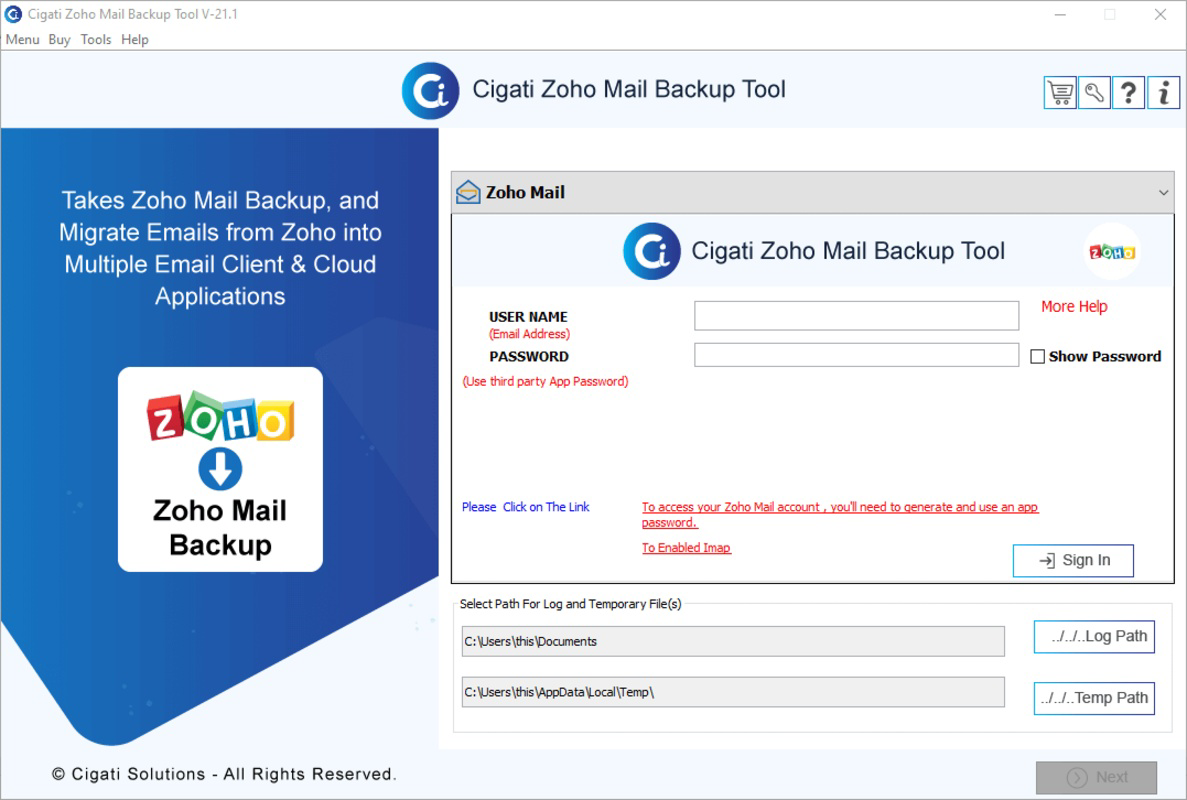
- Intuitive User Interface: Designed with usability in mind, the interface is straightforward and accessible to users of all technical skill levels. Clear navigation and visual cues reduce the learning curve, enabling even non-technical users to complete migration tasks efficiently.
- Free Version for Testing: A trial version is available, allowing users to evaluate core features before purchasing. This provides a risk-free way to assess performance, compatibility, and ease of use in real-world scenarios.
- Windows Compatibility: The application runs on all versions of Windows, including Windows 11, ensuring broad system support. This compatibility allows users to deploy the tool on a wide range of devices without encountering platform-specific limitations.
For example, a business switching from Zoho Mail to Office 365 can use the tool to migrate thousands of emails in bulk while maintaining folder structures. Similarly, an individual consolidating multiple email accounts can export messages into PDF for long-term storage. The tool’s functionality is tailored to real-world data management challenges, offering practical solutions for both personal and professional users.
Interface, UX & Performance
The user interface of Cigati Zoho Mail Backup Tool is described as straightforward and intuitive, prioritizing clarity and ease of navigation. The layout appears designed to guide users through migration and conversion workflows with minimal friction. Visual elements are organized logically, with clear labels and step-by-step prompts that help users understand each phase of the process. Although the developer did not list formal performance metrics, the tool is intended to handle large volumes of email data efficiently. It is designed to operate smoothly across different device categories, including desktop systems with varying hardware configurations. Responsiveness is expected to be consistent, particularly on systems meeting standard Windows requirements. Stability during long-running operations such as bulk migration is implied through the app’s focus on data integrity. The absence of reported crashes or errors in public documentation suggests reliable operation under normal use. However, specific performance benchmarks, load times, or resource usage were not disclosed. Users should expect a consistent experience, though actual results may vary based on system specifications and network conditions. The tool’s design emphasizes usability over complexity, making it accessible even to those with limited technical experience.
Platform Compatibility & Technical Requirements
Cigati Zoho Mail Backup Tool is designed for Windows operating systems, with full compatibility across all versions, including Windows 11. The application is available as a downloadable installer file, and the file size is listed as 25.4 MB. The software version is 1.0.0, and the release date is December 13, 2022. Specific requirements such as minimum RAM, processor speed, or disk space were not listed by the developer. The developer did not specify minimum OS requirements, nor did they provide information on whether the tool supports older Windows versions beyond what is implied by general compatibility. Compatibility with mobile platforms or other operating systems was not disclosed. Users should ensure their system meets standard Windows installation requirements to run the application. For optimal performance, a modern Windows machine with sufficient storage and memory is recommended, though no formal specifications were provided.
Pros and Cons
Pros
- Supports migration from Zoho Mail to multiple email platforms including Gmail and Office 365.
- Offers conversion to various file formats such as PST, MBOX, MSG, and PDF.
- Intuitive interface suitable for users of all technical levels.
- Free version available for testing functionality before purchase.
- Compatible with all Windows versions, including Windows 11.
Cons
- Platform availability limited to Windows; no information on iOS or Android support.
- Specific system requirements were not listed by the developer.
- Performance metrics and resource usage were not disclosed.
- Compatibility with older Windows versions was not explicitly confirmed.
- Mobile app functionality or cloud-based access was not mentioned.
FAQ
Is Cigati Zoho Mail Backup Tool safe to use?
The tool is designed to securely handle email data during migration and conversion. While the developer did not provide third-party security certifications, the application operates locally on the user’s system, minimizing exposure to external risks.
Can I use the free version indefinitely?
The free version allows users to test the tool’s features, but it may include limitations such as restricted export volume or time-based access. Full functionality typically requires a paid license.
Does the app support email folders and subfolders?
Yes, the tool is designed to preserve folder structures during migration, ensuring that emails remain organized in their original hierarchy.
Is the tool compatible with Windows 10?
Yes, the application is compatible with all versions of Windows, including Windows 10, as stated in the official documentation.
Can I migrate emails from Zoho Mail to Gmail using this tool?
Yes, the tool supports migration to Gmail, along with other major email platforms like Office 365 and Yahoo.
Final Thoughts
Cigati Zoho Mail Backup Tool stands out as a focused, practical solution for users needing to transfer or archive email data from Zoho Mail. Its ability to migrate emails across platforms and convert them into multiple file formats makes it a valuable asset for both personal and professional users. The intuitive interface lowers the barrier to entry, while the free version offers a risk-free way to assess its performance. Although the tool is limited to Windows and lacks detailed technical specifications, its core functionality is well-defined and purpose-built. For anyone managing a transition between email services or seeking a reliable backup method, this tool delivers clear value. Its emphasis on data integrity and ease of use reinforces its role in modern digital workflows. Download Cigati Zoho Mail Backup Tool now to securely migrate your Zoho Mail data and ensure long-term accessibility.
Guides & Tutorials for Cigati Zoho Mail Backup Tool
How to install Cigati Zoho Mail Backup Tool
- Click the Preview / Download button above.
- Once redirected, accept the terms and click Install.
- Wait for the Cigati Zoho Mail Backup Tool download to finish on your device.
How to use Cigati Zoho Mail Backup Tool
This software is primarily used for its core features described above. Open the app after installation to explore its capabilities.
User Reviews for Cigati Zoho Mail Backup Tool 0
No reviews found


